The ultimate student academic companion. Get smart period countdowns, track safe bunk margins, share schedules with classmates via 1-tap QR codes, and keep live class schedules right on your phone's home screen launcher!
✨ Drag & move cursor to rotate the 3D phone
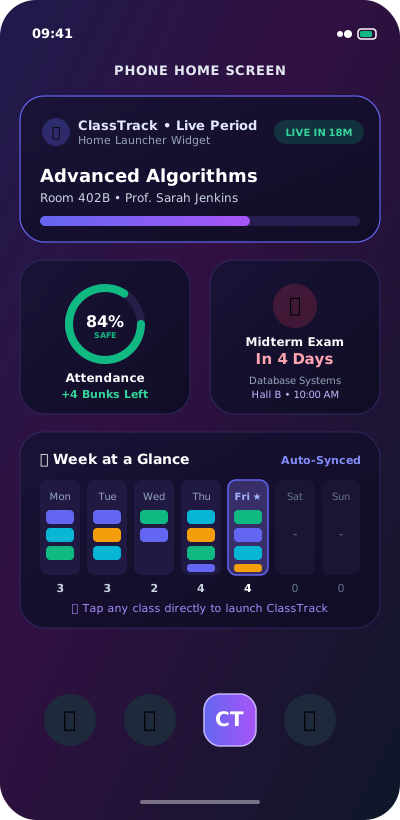
Glance at your current period, room number, teacher, and attendance right on your phone's home screen without ever opening the app.
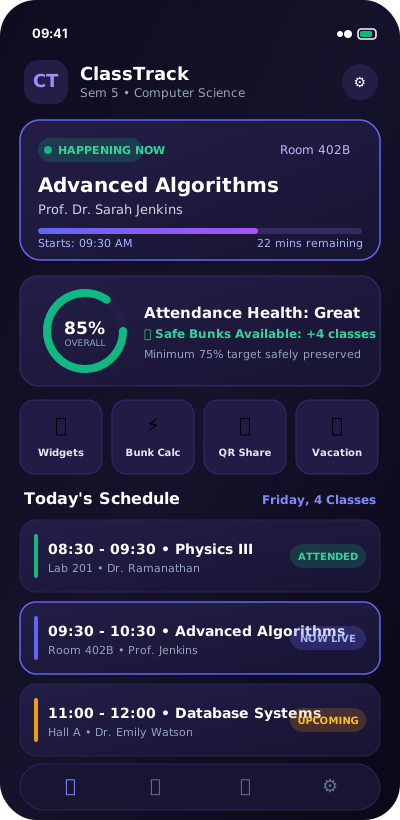
Know exactly how many lectures you can safely bunk without dropping below your 75% target, or how many you must attend to recover.
One friend sets up the timetable for the whole batch. Everyone else scans the QR code in 2 seconds and imports everything!
Schedule your semester holidays and mid-term breaks. Attendance calculations and reminder alarms are automatically paused.
No need to dig through menus or open the app between classes. ClassTrack includes 6 native home launcher widgets that update live in the background.
Curious how ClassTrack helps thousands of students balance fun with perfect academic standing? Adjust the sliders below to see our predictive algorithm calculate your exact safe bunk margin!
Never guess whether skipping tomorrow's 8:30 AM lab will drop you below 75%.
If you're in the red, ClassTrack tells you exactly how many consecutive lectures you need to attend to recover.
Calculate safe margins for tough professors with strict rules or for your overall semester tally.
From the first day of orientation to final exams, ClassTrack replaces messy spreadsheets with intuitive gestures and peace of mind.
Marking attendance doesn't have to be a chore. Swipe right for Present, swipe left for Bunked, or swipe up for Cancelled. Dynamic cards preview the impact on your percentage in real-time.
Switch effortlessly between a panoramic Mon–Sun multi-day grid and an hour-by-hour chronological day timeline with teacher names, room numbers, and recess breaks.
Tired of everyone asking for the timetable? Generate a vector QR code with your full semester schedule. Classmates point their camera and import all lectures in 2 seconds.
Set up semester vacations, festivals, or study leaves. ClassTrack automatically freezes your missed-class counts and pauses early-morning reminders during holidays.
Configurable alarms sound 10 minutes before each period with the exact room number and professor's name, so you never sprint to the wrong lecture hall again.
Keep track of midterms, lab evaluations, and project deadlines with dynamic relative countdown badges ("In 3 days", "Tomorrow", "Next Week").
Built with an eye-friendly dark cosmic theme, glassmorphic cards, and high-contrast typography designed for quick glances in brightly lit lecture halls.


Never installed an APK before? Don't worry! It takes less than 30 seconds and requires zero technical skills.
Tap the Download ClassTrack APK button on this website. Your phone's browser will save the small classtrack.apk installation file.
When prompted with "For security, your phone cannot install unknown apps", simply tap Settings and toggle on "Allow from this source".
Tap Install. Once complete, open ClassTrack, set your name and subjects in the 1-minute setup wizard, and you're all set!
Yes! ClassTrack is 100% free to download and use. There are no subscriptions, no locked features, and no annoying advertisements.
Absolutely. ClassTrack uses an embedded local SQLite database directly on your device. It works seamlessly in airplane mode, deep inside lecture halls, or with zero cellular data.
ClassTrack provides 6 native Android AppWidgets. After installing the app, simply go to your phone's home screen, long-press empty space, select Widgets, find ClassTrack, and place your favorite widget style on your home screen. It automatically updates whenever your classes change.
100% private. ClassTrack does not require any account login or email. All your class schedules, notes, and attendance records remain strictly on your personal phone.
In ClassTrack, tap Share QR to generate a custom code containing your entire weekly schedule, subjects, and timings. Your friends can simply open ClassTrack, tap Scan QR, and their entire timetable is instantly populated with zero typing!
ClassTrack supports Android 8.0 (Oreo) and above, including Android 12, 13, 14, and 15.